
How do you create and use YouTube Shorts for your brand?
Optimize your channel with YouTube Shorts! Learn how to use this short video format to launch engaging content and boost your strategy.
March 12, 2026

YouTube Shorts is The new short video format from YouTube.
Faced with the rise of TikTok, YouTube has launched its own short video format, and it's time for your brand to get on board!
Why? Because since its introduction in 2020, Shorts has already exploded, with over 5 trillion views and gathered over 2 billion users. And the platform is proudly positioned as the Second the most visited site in the world. Shorts are fun, they are fresh, they are the happy snack that everyone loves! It's the perfect way for your brand to gain visibility, to attract and federate a young and trendy audience and to improve the reputation of your brand as quickly as possible. And if you're not there yet, you're missing out on a golden opportunity to reach a large audience.
In this article, we will then explain to you the multiple advantages that YouTube Shorts offers, and how to create a viral Short.
What are YouTube Shorts?
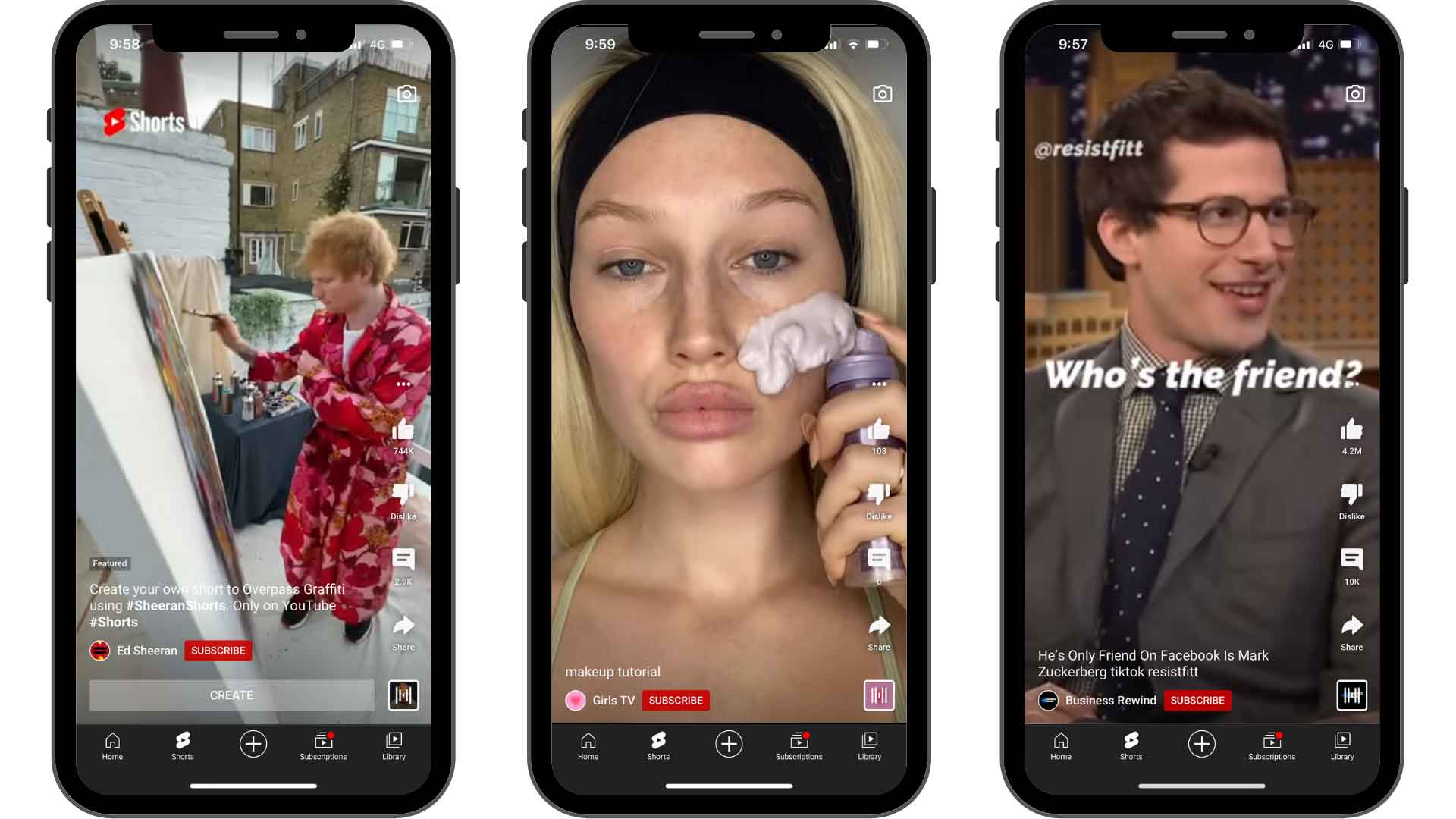
As the name suggests, YouTube Shorts is a short video format.
This new feature newly integrated into the platform, offers access to an unlimited flow of vertical videos. It's designed to make it easy for users to navigate, discovering new videos and content creators.
The Short video is intended to be created on a smartphone, adopting a 9:16 aspect ratio. The layout of the title, description, among others, undoubtedly evokes its main competitor, TikTok, in the short video segment. The main difference lies in the duration: A Short is limited to 60 seconds, unlike TikTok which recently allowed its users to post videos of up to 10 minutes.
Why did YouTube launch this format?
Today, the world of content is undeniably governed by video, a trend in which YouTube is an undisputed pioneer. The platform sculpted our preference for this format, which has now become a pillar of our daily content consumption.
However, the arrival of TikTok revolutionized this field, introducing an innovative format: the short vertical video. This unique style has been a runaway success, encouraging other social media giants to adopt similar concepts; Meta primarily, with the integration of” Reels ” on Instagram and Facebook, and Snapchat with Spotlight. Now, YouTube is joining this dynamic with a special section for short, high-impact videos, 15-second clips designed to instantly capture attention.
But how did YouTube evolve from exclusively horizontal content to adopting this new format?
The vertical trend is largely due to the dominance of mobile devices. Users, especially the Gen Z, prefer to consume video content on their smartphones, promoting experiences that are more immersive and easy to use. Shorts is therefore YouTube's response to this evolution, optimized for unrestricted consumption on all mobile devices, whether they work on iOS or Android.
YouTube Shorts gives content creators a unique opportunity to reach new audiences and direct them to their sites or to longer content on their main YouTube channels. It is a strategic way for content creators to expand their reach and diversify their content, thus meeting the changing consumer expectations when it comes to video content.
What are the benefits of YouTube Shorts for brands?
Who among you is feeling overwhelmed in your life?

In our fast-paced world, where every second resonates with the ping of a new notification, our attention spans are in danger, plummeting by 25% in just a few years.
So, if you are a marketer, good luck catching these wandering eyes! And the short video is precisely the right ally for the young generation, whose The average attention span lasts 8 seconds.
And for a brand that wants to quickly get them interested, short videos are the best experience to offer. They guarantee a notoriety increased and maximized theinvolvement within the YouTube community. Shorts offer brands a unique opportunity to transmit their message in a powerful way, through an entertaining, interactive and captivating medium.
But that is far from being the only interest.
And creating Shorts, brands also have the opportunity to reuse their longer content. A YouTube video lasting several minutes can thus be divided into excerpts on Shorts, but also potentially for TikTok or Instagram (via Reels), or, conversely, videos from these platforms can be published on YouTube Shorts.
And little secret, the YouTube and Google algorithms Love shorts. So, it's not only fun and creative, but it's also a golden way to gain exposure and expand your audience.
The steps to create YouTube Shorts
Now let's move on to practice: How do you create your first YouTube Shorts?
Here we will focus on the technical specifications to be respected for this format. We also share editorial tips for sharing compelling Shorts and maximizing their engagement.

Step 1
To share Shorts on YouTube, you must first download the app.
Step 2
Back on the YouTube app, a menu will appear. Press the (+) icon, this is the button to press to create a Shorts.
Note: If you haven't already done so, YouTube may ask for permission to access your camera and microphone. Be sure to press “Allow.”
Step 3
You are ready to record your first Short!
To record a 15-second video clip, simply Press and hold the red record button or press it to start recording. But if you want to record a full 60-second video, press the number 15 above the record button to change the length of the video.
Step 4
Once you have registered your Shorts, you can edit it directly from the application. For example, you can add special effects by browsing the toolbar on the right side of the screen.
- Press the rotating arrows to change the camera view
- Accelerate or slow down the speed of your Short by pressing the 1x button
- Press the clock icon to set a countdown timer to create hands-free videos
- Add filters to your Shorts by pressing the three circles icon
- Add edits to your video by pressing the magic wand, etc.
Note: You can also use their new application very well”YouTube Create“for editing your videos, on mobile or computer.
Finally, to add music, tap the “Add Sound” icon at the top of the screen.
Note that you can only add an audio track to your Short before you start recording or afterwards, in the editing process.
Step 5
Once you've finished editing your Shorts, tap the check mark to save your Shorts. Or press Download a Shorts to upload your YouTube Short.
Adapt your content to the Shorts format
The aim is to create authentic YouTube Shorts. To achieve this objective, it is imperative to respect the rules associated with short videos on social networks:
- Capture the attention of users immediately by focusing your efforts on the first 3 seconds of the video;
- Share dynamic content. The shorts that work best aren't just continuous footage. Play with the editing (cut, transition, etc.) to maintain viewers' attention;
- Think about revising. Like TikToks, Shorts are broadcast on repeat. Keep this information in mind to make the transition from the start to the end of your video.
- Deliver value (quickly). Don't create Shorts just for the fun of sharing them. Add value to your audience by entertaining them, teaching them something new, or sharing a good plan.
Note: Shorts can also be used as capsules for your longer formats, or as powerful summaries for those pressed for time, conveying the essence of your message in a succinct and attractive way!
Example of content to make your YouTube Short viral
Now that you know how to create YouTube Shorts, we're sharing the best content that easily goes viral on YouTube.
- The entertainment (skits, microsidewalks, pranks, etc.);
- Motivational content (sharing inspiring stories or excerpts from conference/round table discussions);
- Educational content: Short capsules that share unusual information or news;
- Product crash tests, the tutorials or the life hacks.
Never stop Get inspired by trends and content that are a hit on the platform to boost your visibility. Depending on your area of expertise, whether it's cooking, lifestyle, entertainment, etc., study what your audience likes and put it in your own way.
YouTube Shorts have exploded in popularity! Give yourself the chance to expand your audience and increase the engagement of your community. Take advantage of this feature for creating short and engaging videos to grow your YouTube brand channel and attract a new audience.
Do you want to optimize your brand campaigns on YouTube? We are here to help! Contact us, we would love to explore the possibilities to make your brand shine on social networks and make it attractive to Generation Z.





.avif)